Production rules
Some bugs never throw. A retry charges a card twice, a new relation loads one row per product, an agent loop calls the model forty times - every request returns 200, every test passes, and the dashboards stay green until the invoice, the latency, or a customer says otherwise.
A production rule writes down what one request or job may do - "checkout charges the payment provider exactly once", "the product list runs at most three queries", "no request makes more than five LLM calls" - and every kept trace is checked against it as it arrives. The trace that breaks a rule, and the release it came from, are in front of you the moment it happens. When a coding agent wrote the change, a rule is the cheapest review there is: one sentence of what production must keep doing, checked on every deploy without anyone re-reading the diff.
Rules need no new instrumentation: they read the spans the SDK already records - your methods, the agent's database-query and outbound-HTTP spans, and LLM calls. They are included in every paid plan, up to 25 per project, under Activity → Rules in the dashboard. Members with Write or Admin access create and edit them; Read members see them. If a plan lapses, its rules are kept but no longer checked, and checking resumes once the project is on a paid plan again.
Rules worth writing#
| What must hold | The rule | What breaking it usually means |
|---|---|---|
| A payment is taken once | POST /checkout/:orderId/pay calls POST api.stripe.com exactly once | A retry or a duplicated handler charging twice, or a refactor that stopped charging |
| The product list doesn't N+1 | GET /products runs pg SELECT products at most 3 times | A relation now loaded once per row |
| An endpoint stays cheap to run | Every request makes LLM calls at most 5 times | A tool or agent loop that keeps calling the model |
| Admin changes are audited | PATCH /admin/users/:id calls AuditLogService.record at least once | A new code path that skips the audit write |
| A job sends one digest | The send-digest job calls POST api.postmarkapp.com exactly once | A job retried after a partial failure, mailing everyone twice |
The best rules come from a change you just made: what did it have to keep doing? A rule written while you still know the answer keeps holding production to it long after the diff is forgotten.
What a rule says#
A rule reads as one sentence, and the dashboard's form shows that sentence as you write it:
- The operation: one route and method (
POST /checkout/:orderId/pay), one job by name, or every request or every job. A route that hasn't been served yet is fine: the rule reads Unchecked until a kept trace of it arrives. - What it counts in each execution:
- Calls to a class or method: a provider method such as
PaymentsService.charge, or a driver's statement such aspg SELECT orders, named the way the Services view names them. - Outbound HTTP calls to a host:
api.stripe.com, optionally with one method. A host named without a port matches it on any port. - LLM calls: every model call, or one provider's (OpenAI, Anthropic, Azure OpenAI and others, or a gateway you configured).
- Calls to a class or method: a provider method such as
- The bound: exactly, at most, or at least, a number of times per execution.
An upper bound (exactly, at most) is held by every execution, failed ones included. A lower bound (exactly, at least) is held only by executions that succeeded - no error, status below 400 - because a request that failed halfway never got the chance to make its calls.
Only spans the SDK records itself are counted; spans you open by hand with TracerService never are. When one method makes more than 20 identical calls, the SDK keeps the slowest few and folds the rest into a single span (see spanCollapse in the configuration reference). A rule counts the folded calls at their real number, so an N+1 of fifty queries counts as fifty.
Writing one where the evidence is#
You can write a rule from scratch under Activity → Rules, but two shortcuts start one from the telemetry that suggests it:
- Pin as a rule, on the Releases page. Each query, outbound call, or method a release added, or now makes more often, opens the form with the call and a starting bound taken from the release's numbers. The route is left for you to choose, because the release's numbers are averages over every request.
- Guard with a rule, in a trace's waterfall. A run of calls the SDK folded into one span - the shape of an N+1 - opens the form filled in with that trace's own route or job, the call, and a bound of at most 3.
Neither saves anything until you press Create.
Checked on kept traces#
Rules are checked by the trace worker on the traces it keeps, from the moment a rule is saved - never on earlier ones. Edits and switches take effect within about 30 seconds. What that means for the numbers:
- A violation is certain. It is an execution that happened, and its trace is a click away.
- A rule holding is evidence, not proof. When spend controls sample spans, server errors and traces slower than a second are always kept and the rest at the keep rate, so the traces checked lean towards slow and failing ones.
- Counts are traces checked, not requests. A share of checked traces is not a share of requests.
- A thinned window says so. On a day when fewer traces were kept than usual, rules were checked on those alone, and the rule's page warns above its numbers.
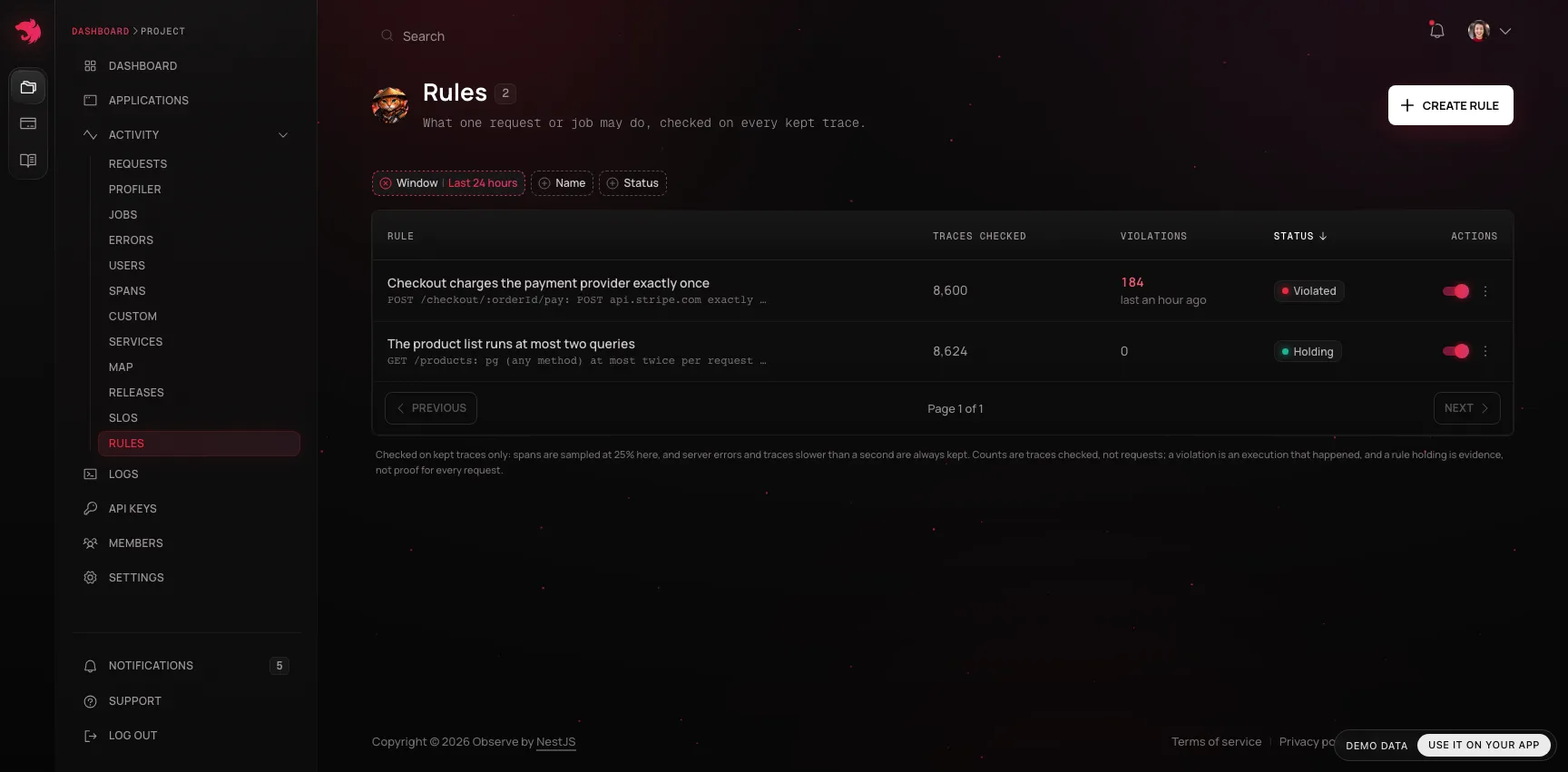
Each rule shows its status for the window you pick (the last 24 hours or the last 7 days):
| Status | Meaning |
|---|---|
| Violated | At least one checked trace broke the rule in the window |
| Holding | Checked, and never broken |
| Unchecked | No kept trace of the operation arrived, so the rule wasn't judged |
| Disabled | Switched off; the counts are from before |
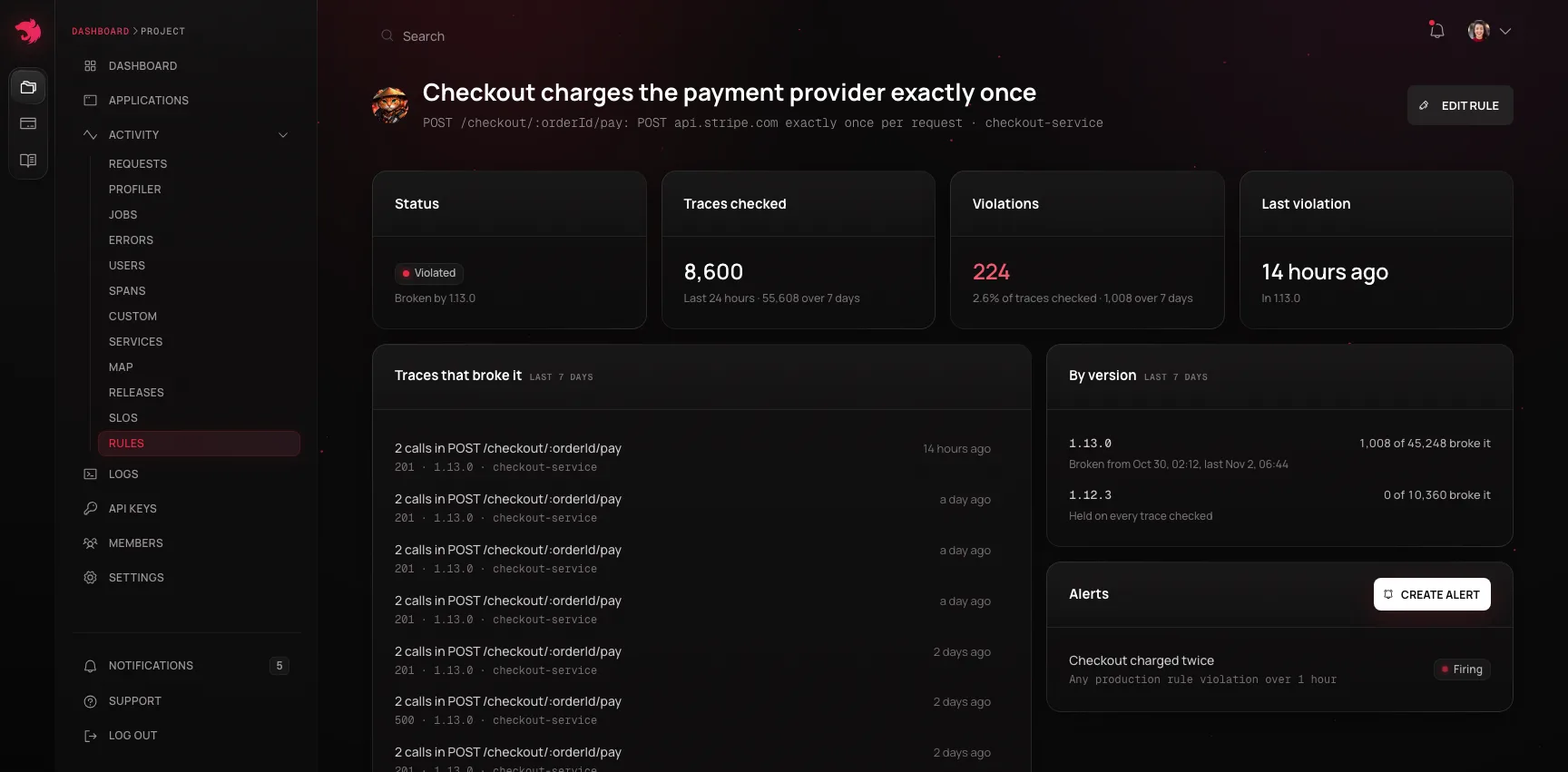
A rule's own page lists the newest traces that broke it, each opening its waterfall, and its checks and violations per release, with when each version started and stopped breaking it - which release broke a rule is usually the first question.
Alerts on a rule#
Turn on Alert me when this rule breaks when you create a rule, and an alert is created with it: more than 0 violations over an hour, severity High, in-app and by email. It fires on the first violating trace and resolves an hour after the last one, once per episode rather than once per request. Any alert rule can also watch the Production rule violations metric, for one rule or for every rule in a project or application.
From a coding agent#
Over the MCP server, on every paid plan, create_production_rule lets the agent that shipped a change pin what production must keep doing while it still knows, and list_rule_violations reads the same report the dashboard shows. Editing and deleting rules stay in the dashboard.
An agent doesn't need to be told rules exist. The instructions the server sends when a client connects name create_production_rule as the write to reach for after shipping a change, get_context_pack lists the project's rules and how each held over the last day, and when a release added an outbound call or a statement, or makes one more often, get_release_verdict ends with a line saying what is worth pinning.
Hint A rule only reads the traces the SDK already sends. Neither the dashboard nor an agent can use one to widen what the SDK captures.